A clear job to do.
Assign business goals, product categories, audiences and channels to each agent instance.
 Let’s talk ↗
Intelligence + eCommerce / Agentic Commerce
Commission specialist agents to sell, support, market, manage content and monitor your business. Axolot Agent Hub combines business context, configurable autonomy and human oversight in the AI Agent Center.
Explore the capabilities ↓
Connect customer requests and internal workflows so teams can act.
01 / AGENT HUB · INSIDE AXOLOT ECOMMERCE
Choose a specialist skillset blueprint, define its scope, KPIs and authority, then activate it when your commerce operation needs it. Monitor its work from the AI Agent Center.
Assign business goals, product categories, audiences and channels to each agent instance.
Decide what it recommends, drafts for approval or executes, with hard limits and a named human owner.
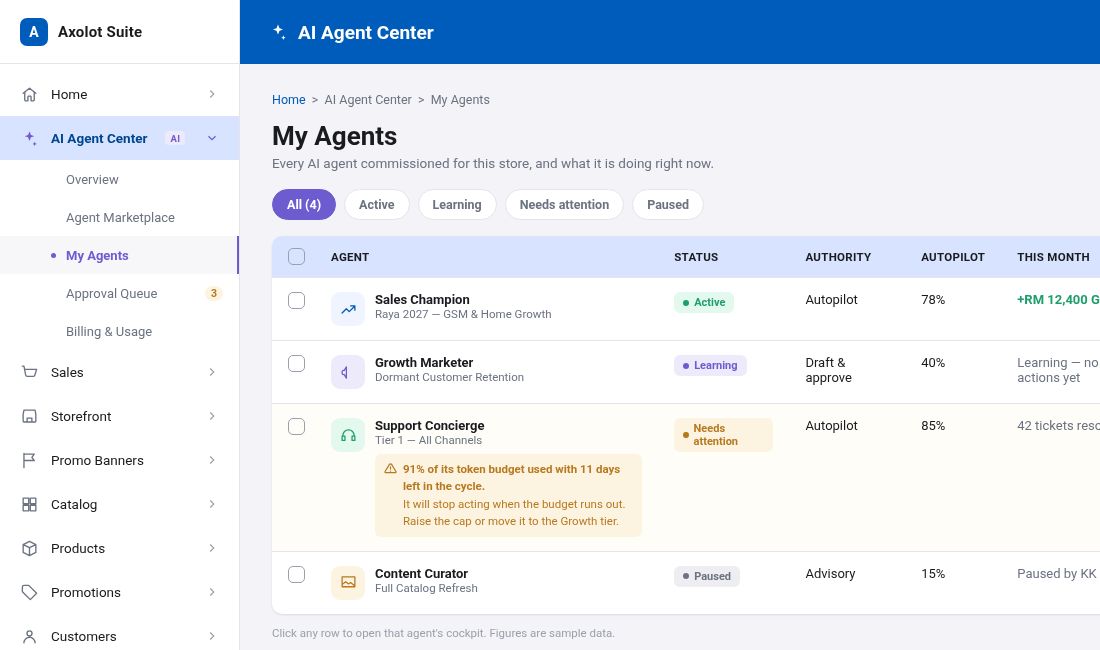
Review activity, campaigns, decision evidence, performance, learning progress and usage in one place.
02 / NINE SPECIALIST ROLES
Browse the Agent Marketplace, compare up to three roles, and commission separate instances for different campaigns, scopes or budgets.
Plans category, SKU and audience campaigns, sets targets, proposes vouchers and runs A/B tests.
03 / GUIDED COMMISSIONING
The blueprint defines the role. You set the business scope, measures and authority before it acts.
Name the agent, choose up to two primary goals, KPIs and a recurring or campaign term.
Choose product categories, audiences and channels within organisation restrictions.
Tune tone, commercial ambition and margin sensitivity to your practices.
Set Manual, Approve or Auto by decision, plus discount, budget and campaign limits.
Assign an owner, escalation contacts and a reporting cadence.
Check configuration, estimated cost and usage, then begin learning before live action.
From the Agent Center, an authorised owner can pause one agent or a selected group when performance, risk or business conditions demand it. Review pending decisions and action history, check any work already handed to connected systems, adjust authority or scope, then resume deliberately.
Pause is an operational control over further agent activity. Completed external transactions may require the applicable business correction or reversal workflow.
04 / AUTHORITY THAT FITS YOUR TEAM
Recommendations for your team to execute.
Prepared actions wait for your sign-off.
Permitted actions run within configured limits; exceptions come to you.
Independent operation with periodic reporting, still subject to hard limits and organisation restrictions.
Configure voucher issuance, price adjustments, campaign launches and A/B winner adoption separately. Conflicting settings are surfaced during setup. Your team can pause, resume or reconfigure agents individually or in groups.
05 / ACCOUNTABILITY IN EVERY ACTION
See the trigger, supporting data, confidence, expected impact and alternatives. Approve or reject proposals in a shared queue, with the reason each action needs your attention.
Give “more like this” or “less like this” feedback. Reverse supported actions while preserving orders already placed. Repeated approvals can prompt a suggestion to delegate similar work—you decide whether to allow it.
Review attributed revenue, conversion, average order value, voucher redemption and margin impact alongside token consumption, fees, projected spend and budget alerts.
SEE AN AI AGENT IN ACTION
Follow an illustrative WhatsApp sales journey as the agent matches products, clarifies a request, checks pricing and a promotion, then confirms the order and next step.
06 / A CONNECTED SOLUTION
AI solution partner
Our strategic AI alliance brings Iguana-powered agents, knowledge infusion and governed automation into Tech Creatures solutions and existing business systems.
Partner solution area
Connect store transactions and product information with your wider commerce ecosystem.
 LET’S MAKE YOUR NEXT MOVE.
LET’S MAKE IT WORK FOR YOUR BUSINESS
THE SERVICES BEHIND THIS SOLUTION
Explore the work that shapes implementation and adoption.