Retail chain execution
Plan by chain, business area, region, outlet and product range. Give commercial owners a clear view of display, POSM, price and availability outcomes.
 Let’s talk ↗
ORCAS / PROMOTION EXECUTION MANAGEMENT
Protect the selling window behind every trade promotion. ORCAS connects campaign planning, field execution, on-shelf availability and issue resolution through an Admin Portal and Mobility App for FMCG brands serving modern and general trade.

01 / WHO IT IS FOR
FMCG manufacturers, brand owners and distributors coordinating trade promotions across retail chains, independent outlets, territories and multiple product lines.
Plan by chain, business area, region, outlet and product range. Give commercial owners a clear view of display, POSM, price and availability outcomes.
Apply the same route, task and evidence discipline to independent stores or distributor-served outlets, with customer grouping and territory rules configured for the business.
Give each person a sequenced daily route, visit brief, product-level tasks and a reliable way to finish work even when connectivity is poor.
02 / THE COST OF AN EXECUTION GAP
Promotion windows are short. A paid display space without stock, a late setup or an unresolved store issue can waste trade marketing investment and lose sales while the offer is most relevant.
Fast-moving promotional SKUs disappear from shelf. Per-variant stock checks and OOS reasons surface a replenishment need while there is still time to act.
A gondola end, feature bay or event space has a booked period. Missed or delayed setup reduces selling days and the return on that placement.
Unavailable display space, refused entry, missing POSM or an absent store contact needs a recorded reason and a fast route to the commercial or operations owner.
Attendance alone does not show which targeted outlets are ready. Track execution rate, on-shelf availability, issue rate and completion within the early campaign window.
Field submissions flow to role-based monitoring and review. Stock gaps can prompt replenishment follow-up; blocked displays and rejected tasks can return to a planned visit. Each exception remains visible until its next action is recorded.
03 / THE CONNECTED EXECUTION LOOP
Two connected workspaces carry an approved campaign from head office to the shelf, then bring evidence and exceptions back to the people who can act.
Set accounts, business areas, allowed tasks and timing. Create account-level activities within the approved scope.
Assign outlets, combine work at the same store and sequence visits around territories and leave.
Check in, complete required SKU tasks, capture photos and customer sign-off, then sync.
Approve evidence, investigate failures and send follow-up or near-expiry rechecks to the field.
04 / ADMIN PORTAL
Trade operations and sales leaders plan campaigns, arrange coverage and review the work that needs intervention. The portal connects commercial intent to a specific outlet visit.
Conceptual view of the documented work areas; it does not depict live client data.
05 / MOBILITY APP
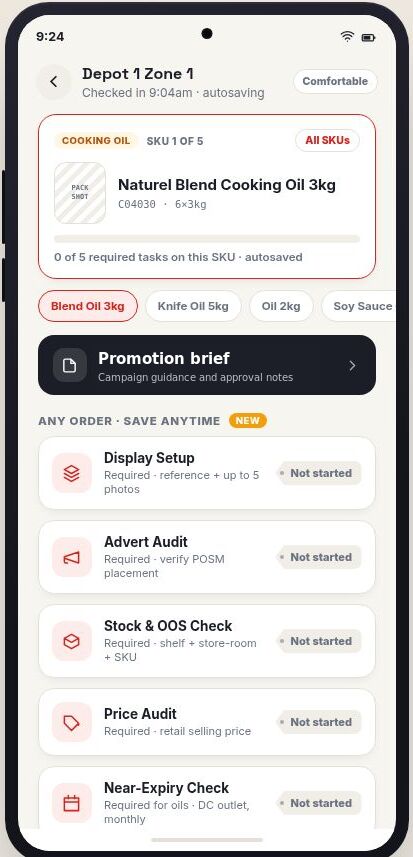
Salespeople and merchandisers see their route, the outlet brief and the products to inspect. Each required task has an explicit outcome and evidence requirement, so the field team can complete the visit efficiently and report a stock or setup blocker from the outlet.
Actual screen from the supplied field app prototype; client-specific campaign label has been anonymised.
06 / THREE CONNECTED WORKSTREAMS
Promotion and routine audit demand can meet in one planned stop. Near-expiry findings become managed cases with a clear path back to the field.
Display setup, advertising materials, stock and price checks are assigned to the relevant products and outlets. Time-bound execution, photo evidence and approval make paid-for placements verifiable.
Recurring stock and price inspections follow a structured cycle. Combine an audit with promotion work at the same store to reduce duplicate visits.
New outlet opening and in-store event checklists support staged preparation, launch, replenishment and close-out with recorded evidence.
07 / NEAR-EXPIRY CASE MANAGEMENT
A near-expiry finding becomes a case, with an action from the commercial team and a follow-up on subsequent visits. It does not disappear after the first inspection.
Capture SKU variant, batch, expiry date, quantity and photo evidence.
Trade operations and the commercial owner choose an allowed action and validity period.
The next outlet visit carries the open case and its required inspection.
Record cleared or still present; a skipped recheck is flagged separately.
08 / THE BUSINESS RESULT
Give trade marketing, sales and operations a shared view of execution during the campaign and evidence for the next investment decision.
Track setup against the display period and the early execution window, so late or missing work is visible before the campaign passes.
Per-variant OOS reporting and on-shelf availability views show where replenishment follow-up could recover promotional sales.
Failed setup, missing POSM, refused entry and stock gaps carry a reason, evidence and a path to review or re-visit.
Compare completion, timing, OSA and issue patterns by campaign, region and chain to improve targeting, dispatch and trade-spend decisions.
Dashboards support timely intervention; resolution speed depends on the responsible team and connected replenishment process. KPI definitions, integration scope and operating rules are configured for each brand.
ORCAS / PROMOTION EXECUTION MANAGEMENT
Map the campaign journey, the outlet footprint and the field decisions you need to see.
THE SERVICES BEHIND THIS SOLUTION
Explore the work that shapes implementation and adoption.